Image AIProduct ShotsIntermediate60 minSaves 1 hour

Music Event Poster: Bold Graphic Screenprint Style

Poster designers for music events can quickly generate striking, style-consistent illustrations featuring bold graphics and screenprint textures for upcoming promotions.

This prompt helps designers create unique music event poster illustrations. It focuses on a bold graphic style, a limited color palette, and a distinct screenprint texture, providing a solid foundation for visual consistency across promotional materials.

READY-TO-USE PROMPT

Copy Prompt

prompt.txt
Role: You are an experienced graphic illustrator specializing in event poster design. Your expertise lies in translating conceptual themes into visually impactful, style-consistent artwork suitable for screen printing.

Context: I need to generate an illustration for a music event poster. The design must adhere to a specific aesthetic: bold graphic forms, a restricted color palette, and a noticeable screenprint texture. The final output should be a detailed image generation prompt that captures these requirements, along with appropriate negative prompts.

Task: Develop a comprehensive image generation prompt for an AI model. This prompt should clearly define the subject matter, composition, color scheme, and rendering style, ensuring the output is a high-quality illustration for a music event. The prompt must incorporate the event's core details and desired visual elements.

Constraints:
*   **Style**: Bold graphic illustration, reminiscent of vintage concert posters or modern indie screenprints. Avoid photorealism, 3D rendering, or overly complex gradients.
*   **Palette**: Limited to 3-5 distinct colors. Specify these colors or describe them (e.g., "vibrant primary colors," "muted earth tones").
*   **Texture**: Prominent screenprint texture, including slight misregistration, ink bleed, and halftone dots where appropriate.
*   **Composition**: Dynamic and engaging, suitable for a poster format. Focus on a central visual element or a clear hierarchy of elements.
*   **Subject**: Directly related to the music event's theme or genre.
*   **Output Format**: A single, coherent image generation prompt string, followed by a separate list of negative prompts.

Output:
Provide a single, detailed image generation prompt string. This string should incorporate the following variables:
*   `{{event_name}}`: The name of the music event.
*   `{{musical_genre}}`: The primary genre of music featured.
*   `{{key_visual_elements}}`: Specific objects, symbols, or abstract forms that should be central to the illustration.
*   `{{color_palette_description}}`: A description of the desired limited color palette (e.g., "deep blues, electric yellows, stark white, and black").

Example structure for the output prompt:
"A poster illustration for the {{event_name}} music event, celebrating {{musical_genre}}. The central visual features {{key_visual_elements}}. Style: bold graphic illustration, screenprint texture, limited {{color_palette_description}} palette, high contrast, flat colors, strong lines, vintage concert poster aesthetic, slight misregistration, ink bleed, halftone dots, dynamic composition, suitable for print. --ar 2:3 --style raw"

Following the main prompt, provide a list of negative prompts to ensure the desired style and quality.

Negative Prompts:
"photorealistic, 3D render, blurry, low resolution, watermark, text, words, signatures, complex gradients, smooth, digital art, cartoon, anime, painting, photograph, realistic, detailed skin, soft lighting, multiple light sources, busy background, cluttered, extra limbs, deformed, ugly, tiling, out of frame, disfigured, bad art, deformed, poorly drawn, extra limbs, close up, b&w, black and white, sepia, grayscale, dull colors, pastel colors, neon colors, shiny, glossy"

Estimated results

DifficultyIntermediate
Setup time60 min
Time saved1 hour
Best modelsMidjourney, Flux
Best audienceEntertainment, Design

Editor's note

Why this prompt matters

Event poster design requires a distinct visual language, often needing to communicate a mood or genre instantly while adhering to specific stylistic constraints. Designers frequently face the challenge of generating fresh concepts quickly, particularly for niche aesthetics like bold graphic illustration with screenprint textures. This workflow is crafted for poster designers working on music events, enabling them to rapidly prototype visual ideas that maintain a consistent, intentional style.

It addresses the common hurdle of translating a precise artistic vision into an initial image concept without extensive manual iteration. By clearly defining stylistic parameters upfront, designers can explore multiple compositional ideas or color schemes for an upcoming festival or concert. This approach is most valuable when a project calls for a specific vintage or indie screenprint aesthetic, where exact rendering styles and limited palettes are non-negotiable elements of the final design.

Anatomy

Prompt engineering breakdown

Role

Experienced graphic illustrator specializing in event poster design.

Context

Generate an illustration for a music event poster with specific aesthetic requirements: bold graphic forms, restricted color palette, and screenprint texture. The output should be a detailed image generation prompt with negative prompts.

Goal

Develop a comprehensive image generation prompt that defines subject, composition, color, and rendering style for a high-quality music event poster illustration, incorporating event details and visual elements.

Constraints

Style: bold graphic, vintage concert poster/indie screenprint. Avoid photorealism, 3D, complex gradients. Palette: limited 3-5 distinct colors. Texture: prominent screenprint, misregistration, ink bleed, halftone. Composition: dynamic, poster format, central element/hierarchy. Subject: related to event theme/genre. Output: single prompt string with variables, followed by negative prompts.

Output format

A single, detailed image generation prompt string incorporating `{{event_name}}`, `{{musical_genre}}`, `{{key_visual_elements}}`, `{{color_palette_description}}`. Followed by a list of specific negative prompts.

Why this structure works

This prompt uses role priming to establish expertise and a clear context for the task. Explicit constraints on style, palette, and texture guide the AI toward the desired aesthetic, preventing unwanted outputs. The structured output format with placeholders ensures all necessary event details are included, making the generated prompt highly specific and usable.

Pick your version

Prompt variations

BeginnerWorks with any model

For users new to AI image generation or those needing a straightforward prompt for a bold graphic poster without extensive detail control.

prompt.txt
Generate a simple, bold graphic illustration for a music event poster named '{{event_title}}'. The primary visual should be {{main_visual_theme}}. Use a restricted color palette, such as {{simple_color_palette}}, to keep it clean. Ensure the final image has a distinct screenprint texture, including visible dots and ink effects. The composition should be clear and striking, suitable for a poster. Do not include photographs, 3D elements, or anything too detailed. --ar 2:3 --style raw
ProfessionalBest with midjourney

For experienced designers with a clear vision, familiar with detailed prompt engineering and looking to replicate a specific vintage screenprint aesthetic.

prompt.txt
As a seasoned graphic illustrator, create an image generation prompt for a music event poster. The event, '{{event_name}}', celebrates {{musical_genre}}. The core visual features {{key_visual_elements}}. The style must be bold graphic illustration, evoking vintage concert posters or indie screenprints. Adhere to a limited palette of {{color_palette_description}}, avoiding complex gradients. Incorporate prominent screenprint texture, including slight misregistration, ink bleed, and halftone dots. The composition should be dynamic and engaging, designed for a poster. Ensure the output is a detailed image generation prompt string, followed by the negative prompts: 'photorealistic, 3D render, blurry, low resolution, watermark, text, words, signatures, complex gradients, smooth, digital art, cartoon, anime, painting, photograph, realistic, detailed skin, soft lighting, multiple light sources, busy background, cluttered, extra limbs, deformed, ugly, tiling, out of frame, disfigured, bad art, deformed, poorly drawn, extra limbs, close up, b&w, black and white, sepia, grayscale, dull colors, pastel colors, neon colors, shiny, glossy'. --ar 2:3 --style raw
Short VersionWorks with any model

When a concise, direct prompt is preferred for quick iteration, focusing on the essential style and subject elements without verbose instructions.

prompt.txt
Generate an image prompt for a music event poster for '{{event_name}}' featuring {{musical_genre}}. The central visual should be {{visual_focus}}. Employ a bold graphic illustration style with a limited {{color_palette}} palette and distinct screenprint texture (misregistration, halftone dots). Aim for a high-contrast, flat color aesthetic reminiscent of vintage concert art. Avoid photorealism or complex gradients. --ar 2:3 --style raw
EnterpriseBest with flux

For large organizations or agencies requiring adherence to brand guidelines, legal considerations, and stakeholder approval processes for commercial projects.

prompt.txt
Develop an image generation prompt for a music event poster, '{{event_name}}', for {{musical_genre}}, ensuring compliance with brand guidelines. The central visual element will be {{key_visual_elements}}. The required style is bold graphic illustration with a prominent screenprint texture, including misregistration and halftone effects, suitable for multi-platform deployment. The color palette must be restricted to {{color_palette_description}} to maintain brand consistency and print cost efficiency. This prompt must produce an illustration that aligns with corporate visual identity standards and is pre-vetted for public release. Avoid any outputs resembling photography, 3D renders, or overly smooth digital art to mitigate brand dilution risks. The final output must be easily adaptable for various marketing materials following stakeholder approval. --ar 2:3 --style raw

What you'll get

Expected output

Here is an example of the image generation prompt this workflow produces, based on user inputs for a hypothetical music event:

User Input:

  • Event Name: "Rhythm Resonance Festival"
  • Musical Genre: "Afro-Cuban Jazz"
  • Key Visual Elements: "a stylized conga drum radiating sound waves, surrounded by tropical foliage, abstract musical notes"
  • Color Palette Description: "warm ochre, deep terracotta, jungle green, and stark black"

Generated Image Generation Prompt: "A poster illustration for the Rhythm Resonance Festival music event, celebrating Afro-Cuban Jazz. The central visual features a stylized conga drum radiating sound waves, surrounded by tropical foliage, abstract musical notes. Style: bold graphic illustration, screenprint texture, limited warm ochre, deep terracotta, jungle green, and stark black palette, high contrast, flat colors, strong lines, vintage concert poster aesthetic, slight misregistration, ink bleed, halftone dots, dynamic composition, suitable for print. --ar 2:3 --style raw"

Negative Prompts: "photorealistic, 3D render, blurry, low resolution, watermark, text, words, signatures, complex gradients, smooth, digital art, cartoon, anime, painting, photograph, realistic, detailed skin, soft lighting, multiple light sources, busy background, cluttered, extra limbs, deformed, ugly, tiling, out of frame, disfigured, bad art, deformed, poorly drawn, extra limbs, close up, b&w, black and white, sepia, grayscale, dull colors, pastel colors, neon colors, shiny, glossy"

Description of the resulting image: The generated image would depict a vibrant, high-contrast poster. At its center, a simplified, graphic conga drum would be shown, rendered in deep terracotta and warm ochre, with stylized jungle green sound waves emanating from it. The drum would be framed by bold, flat shapes of tropical leaves in varying shades of green, with hints of ochre or terracotta for contrast. Abstract black musical notes would be subtly integrated into the background or foreground, adding to the composition's dynamism. The entire illustration would feature a distinct screenprint texture, visible in slight color misregistrations along edges, subtle ink bleed, and a fine halftone dot pattern, especially in areas of color transition. The limited palette would create a striking, cohesive visual, evoking the energy of Afro-Cuban Jazz while maintaining a vintage, handcrafted poster aesthetic.
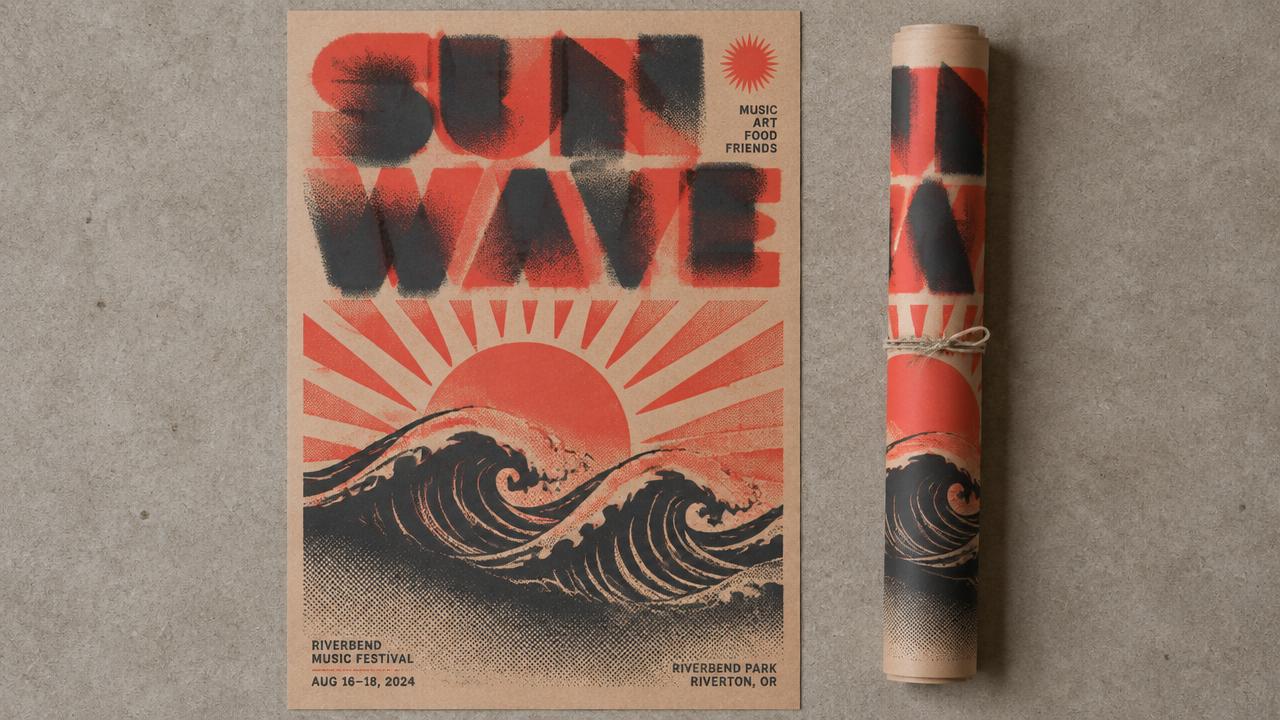
Under the hood

Why this prompt works

This structured approach yields superior results compared to a brief, single-line instruction due to several key prompt engineering techniques. First, role priming establishes the AI's persona as an experienced graphic illustrator, setting an expectation for sophisticated, genre-aware output. This primes the model to think like a professional designer rather than a generic image generator.

Crucially, explicit constraints are detailed for style, palette, texture, and composition. This granular specification leaves little room for misinterpretation, ensuring the output aligns precisely with the desired bold graphic, screenprint aesthetic, and limited color scheme. Without these constraints, a model might default to photorealism, complex gradients, or an unlimited color range, requiring extensive post-generation editing.

The structured output format guarantees that the final image generation prompt is comprehensive and consistently includes essential parameters like --ar 2:3 for aspect ratio and --style raw for a less interpretive rendering. Finally, the inclusion of an exhaustive list of negative prompts acts as a capable filter, actively preventing common undesirable elements such as blurry images, photorealistic rendering, or cluttered compositions, thereby refining the output quality significantly and reducing the need for regeneration.

Model fit

Best AI models for this prompt

Midjourney

Midjourney excels at interpreting stylistic directives, making it a strong choice for generating illustrations with specific artistic textures like screenprint. Its ability to maintain a consistent aesthetic across multiple generations and its nuanced understanding of art movements help produce high-quality, stylized outputs. However, precise control over color counts can sometimes require iteration. See the full Midjourney hub for deeper guidance.

Flux

Flux is well-suited for graphic design tasks that require a clean, bold aesthetic. It handles limited color palettes and strong line work effectively, which are crucial for a screenprint style. While it might require more specific prompting for texture details compared to Midjourney, its speed and directness in generating graphic elements are beneficial for rapid prototyping. See the full Flux hub for deeper guidance.

When to use

  • When a distinct, non-photorealistic aesthetic is required for music event posters.
  • For projects specifically seeking a vintage concert poster or modern indie screenprint look.
  • When working within the creative constraint of a limited color palette is desired.
  • To rapidly generate multiple style-consistent illustration concepts for client review.
  • When the final artwork needs to emulate traditional print imperfections like slight misregistration or ink bleed.

When not to use

  • If photorealism, detailed photography, or complex 3D rendering is a core requirement.
  • For designs that demand a broad, unrestricted spectrum of colors or gradients.
  • When precise textual information or legible event details must be generated within the image itself.
  • If the project requires hyper-realistic depictions of faces or specific individual likenesses.
  • For purely typographic posters without any illustrative elements.

Get more from it

Pro tips

  • 1

    Start with a clear, concise concept for `{{key_visual_elements}}` to avoid generic outputs. This prevents vague or uninspired central imagery.

  • 2

    Experiment with specific color names or hex codes in `{{color_palette_description}}` for precise control, preventing unintended color shifts.

  • 3

    Iterate on the `{{musical_genre}}` input; a sub-genre or specific musical era can yield more distinct visual cues, avoiding bland results.

  • 4

    Adjust the `--ar` (aspect ratio) parameter early in Midjourney to match your specific poster dimensions, preventing awkward cropping later.

  • 5

    Emphasize specific screenprint imperfections like 'heavy halftone dots' or 'visible ink bleed' to enhance texture, preventing overly clean digital aesthetics.

  • 6

    If results lack boldness, add 'high contrast' or 'strong graphic shapes' to the `{{key_visual_elements}}` description, ensuring impactful compositions.

Don't ship this

Common mistakes

  • Using overly complex or lengthy descriptions for `{{key_visual_elements}}`.

    Fix — Simplify core elements to 1-3 key objects or abstract forms for better AI interpretation and focus on the central theme.

  • Describing the desired color palette too vaguely (e.g., 'bright colors').

    Fix — Use specific color names or a descriptive range like 'deep blues, electric yellows, stark white, and black' for precise control.

  • Expecting the AI to generate legible event names or other text within the image.

    Fix — Plan to add all typography in post-production using design software; AI struggles with coherent, readable text.

  • Not iterating on negative prompts to refine unwanted elements or styles.

    Fix — Review initial outputs for common flaws and add targeted negative prompts like 'smooth gradients' or 'digital painting' to refine.

  • Neglecting to include the `--style raw` parameter for Midjourney generations.

    Fix — Including `--style raw` helps maintain a more illustrative, less stylized result, adhering closer to the prompt's explicit style intent.

People also ask

Frequently asked questions

Q.Can this prompt be adapted for album art instead of just posters?

Yes, the core principles of bold graphic style, limited palette, and screenprint texture translate well. For album art, adjust the aspect ratio to square (e.g., --ar 1:1) to fit standard cover dimensions.

Q.What if my design requires more than the specified 3-5 colors?

While the prompt emphasizes a limited palette, you can experiment with slightly more colors. Be aware that pushing past 5 might challenge the AI to maintain the 'limited' constraint effectively, so test outputs carefully.

Q.Will the AI automatically generate the event name or band details within the artwork?

No, AI image generators are generally unreliable for generating coherent, legible text. You should plan to overlay all specific event names and textual details using your preferred design software in post-production.

Q.How can I ensure the screenprint texture is very prominent in the final output?

To emphasize texture, add stronger descriptors. Incorporate keywords like 'heavy screenprint texture,' 'visible halftone dots,' 'ink bleed,' and 'slight misregistration' directly into your {{key_visual_elements}} or {{color_palette_description}} sections.

Q.Is this prompt suitable for generating photorealistic band portraits or stage photography?

No, this prompt is explicitly designed to avoid photorealism and 3D rendering. It focuses on a bold graphic illustration style and will actively steer the AI away from realistic or photographic imagery.

Q.How concise should my input for `{{key_visual_elements}}` be?

Keep it concise, ideally 3-7 words. Focus on the most important symbolic elements or central figures to guide the AI effectively without over-constraining its creative interpretation.

Version 1.0Last reviewed July 23, 2026
Reviewed by PromptInFlow Editorial Team