Image AIProduct ShotsAdvanced90 minSaves 2+ hours

Editorial Product Shot: Sculptural Handbag on Marble Plinth

For fashion brand creative teams, generate high-fidelity editorial product photography of a sculptural handbag, ensuring a magazine-spread aesthetic with precise lighting and styling.

Craft detailed image prompts for editorial product photography, focusing on a sculptural handbag. This prompt guides AI models to produce magazine-quality visuals, specifying subject, styling, lighting, lens, and mood for a sophisticated, brand-aligned aesthetic. Includes ratio variants and negative prompts.

READY-TO-USE PROMPT

Copy Prompt

prompt.txt
As an Art Director and Product Photographer, your objective is to generate a precise image prompt for AI models, focusing on high-end editorial product photography.

### Context

We are developing imagery for a luxury fashion accessory brand. The goal is to create a visual that evokes a magazine spread, highlighting the sculptural qualities and premium craftsmanship of a specific handbag. The image needs to convey sophistication and artistic intent, suitable for a discerning audience in fashion and design.

### Task

Formulate a comprehensive image generation prompt. The prompt must describe an editorial product shot featuring a {{product_name}} (e.g., a sculptural leather handbag, a minimalist ceramic vase, a geometric metal sculpture) displayed prominently on a {{surface_material}} (e.g., a polished white marble plinth, a raw concrete block, a dark walnut pedestal). The overall aesthetic should be clean, art-directed, and focused on texture, form, and light.

### Constraints

*   **Tone**: Art-director, lighting-precise, brand-true. Avoid overly dramatic or commercial angles.
*   **Subject Focus**: The {{product_name}} must be the undeniable focal point. Its unique shape and material texture should be emphasized.
*   **Styling**: Minimalist and sophisticated. The {{surface_material}} should complement, not distract. No extraneous props unless explicitly requested and justified for the editorial feel.
*   **Lighting**: Soft, directional studio lighting. Aim for a chiaroscuro effect that highlights contours and depth without harsh shadows. Consider a subtle rim light to define edges. The lighting should feel intentional and professional, mimicking a high-end studio setup.
*   **Lens/Perspective**: Medium telephoto lens (e.g., 85mm or 100mm equivalent) for a slightly compressed, elegant perspective. Eye-level or slightly elevated angle to present the product with authority. Shallow depth of field to isolate the product.
*   **Mood**: Elegant, refined, artistic, serene, luxurious.
*   **Output Structure**: The prompt should be structured clearly, detailing subject, styling, lighting, lens, and mood. Include two distinct aspect ratio variants and a list of negative prompts.

### Output

Provide the complete image prompt, formatted for direct input into an AI image generation model. Include the following sections:

**Image Prompt:**

`[Subject Description], [Styling Details], [Lighting Description], [Lens/Perspective Details], [Mood/Aesthetic Keywords]`

**Aspect Ratio Variants:**

*   `--ar 3:2` (Standard editorial landscape)
*   `--ar 4:5` (Standard editorial portrait)

**Negative Prompts:**

`--no [undesired elements]`

**Example Structure for your output:**

`A sculptural leather handbag, minimalist design, displayed on a polished white marble plinth, studio shot, soft directional lighting from top-left, subtle rim light, shallow depth of field, 85mm lens, elegant, refined, luxurious, high-resolution, editorial photography. --ar 3:2 --no blurry, noisy, cluttered, amateur, low-quality, distorted, watermark, text, ugly, oversaturated, cartoon, illustration`

Estimated results

DifficultyAdvanced
Setup time90 min
Time saved2+ hours
Best modelsMidjourney, Flux
Best audienceFashion, Retail

Editor's note

Why this prompt matters

Creating high-fidelity product photography for luxury fashion accessories often requires significant investment in studio time, skilled photographers, and art direction. For fashion brands and creative teams, the challenge lies in producing consistent, brand-aligned visual assets that convey sophistication and quality, often under tight deadlines and budget constraints. This workflow addresses that need by enabling the rapid generation of editorial-quality product shots.

This prompt is designed for art directors, product designers, and marketing professionals who require precise control over the aesthetic of their visual content. It streamlines the initial conceptualization and execution phases of product imagery, allowing for quick iterations and exploration of various styling and lighting scenarios without the overhead of a traditional photoshoot. Whether for mood boards, early-stage marketing campaigns, or supplementary e-commerce visuals, this method provides a capable tool for visual development.

Reach for this workflow when your brand demands imagery that feels curated and art-directed, suitable for a magazine spread or high-end advertising. It is particularly effective for showcasing items where form, texture, and subtle lighting are critical to communicating the product's value and artistic intent.

Anatomy

Prompt engineering breakdown

Role

Art Director and Product Photographer

Context

Developing imagery for a luxury fashion accessory brand, aiming for a magazine-spread visual that highlights sculptural qualities and premium craftsmanship. Needs to convey sophistication and artistic intent.

Goal

Generate a precise AI image prompt for an editorial product shot of a {{product_name}} on a {{surface_material}}, emphasizing texture, form, and light with a clean, art-directed aesthetic.

Constraints

Art-director, lighting-precise, brand-true tone. Product must be focal point. Minimalist styling. Soft, directional studio lighting with chiaroscuro and subtle rim light. Medium telephoto lens (85mm/100mm), eye-level/slightly elevated. Shallow depth of field. Elegant, refined, artistic, serene, luxurious mood. Output structured with subject, styling, lighting, lens, mood, two aspect ratios, and negative prompts.

Output format

AI image prompt structured as `[Subject Description], [Styling Details], [Lighting Description], [Lens/Perspective Details], [Mood/Aesthetic Keywords]` followed by `--ar 3:2`, `--ar 4:5`, and `--no [undesired elements]`.

Why this structure works

The prompt employs role priming by assigning the persona of an Art Director and Product Photographer, which sets the expected tone and level of detail. Explicit constraints on lighting, lens, and mood guide the AI toward a specific high-end aesthetic. Finally, the structured output format ensures the generated prompt is directly usable and covers all necessary photographic elements.

Pick your version

Prompt variations

BeginnerWorks with any model

When you're new to AI image generation or need a quick, straightforward prompt without extensive technical detail.

prompt.txt
Generate an image prompt for a high-quality product photo. Show a {{simple_product_item}} (like a pretty necklace or a cool watch) placed on a {{simple_background_surface}} (like a clean wooden table or a smooth stone). The picture should look like it belongs in a fancy magazine. Use soft light to make the product stand out and look elegant. Keep the background simple and clean. The camera should be close to the product, making it the main focus. The overall feeling should be calm and fancy. Give me two different picture shapes and things to avoid.
ProfessionalBest with midjourney

When you require detailed control over lighting, composition, and mood, mirroring professional photography briefs.

prompt.txt
As an experienced studio photographer, create an AI image prompt for a sophisticated editorial product shot. The subject is a {{distinctive_product}} (e.g., a hand-crafted leather wallet, an antique silver locket) positioned on a {{textured_platform}} (e.g., a rough concrete slab, a brushed metal sheet). The composition should reflect a minimalist, art-directed aesthetic. Employ soft, diffused studio lighting from a high angle to create subtle shadows and highlight material textures. A narrow depth of field, achieved with a 100mm equivalent lens, should isolate the product. The mood should be one of understated luxury and contemplative artistry. Include two aspect ratios and negative terms for common image flaws.
Short VersionBest with flux

For rapid iteration or when you need a concise prompt for models that respond well to brevity without losing key directives.

prompt.txt
Craft an AI prompt for an editorial product photograph: a {{unique_item}} on a {{elegant_base}}. Emphasize sculptural form with soft, directional studio lighting and a shallow depth of field. Use a medium telephoto lens perspective for a refined, luxurious mood. Include `--ar 3:2` and `--ar 4:5` variants, plus standard negative prompts for quality control. Focus on clean lines and material integrity for a high-end magazine aesthetic.
EnterpriseBest with midjourney

For brand-sensitive projects requiring adherence to strict guidelines, legal compliance, or specific stakeholder approvals.

prompt.txt
As a Brand Imaging Lead, develop an AI image prompt for a high-value editorial product shot that adheres to our brand's visual identity guidelines. The subject is a {{proprietary_product_sku}} placed on a {{approved_display_surface}}. The image must convey exclusivity and craftsmanship, suitable for global marketing channels, avoiding any elements that could misrepresent brand values or intellectual property. Lighting must be meticulously controlled studio light, creating a chiaroscuro effect to accentuate form without distortion. The composition requires a medium telephoto perspective with a controlled shallow depth of field, approved for all digital and print media. Output must include two aspect ratios and a comprehensive list of negative prompts to prevent brand-diluting artifacts or unauthorized content. Ensure all generated elements align with legal and compliance standards regarding product representation.

What you'll get

Expected output

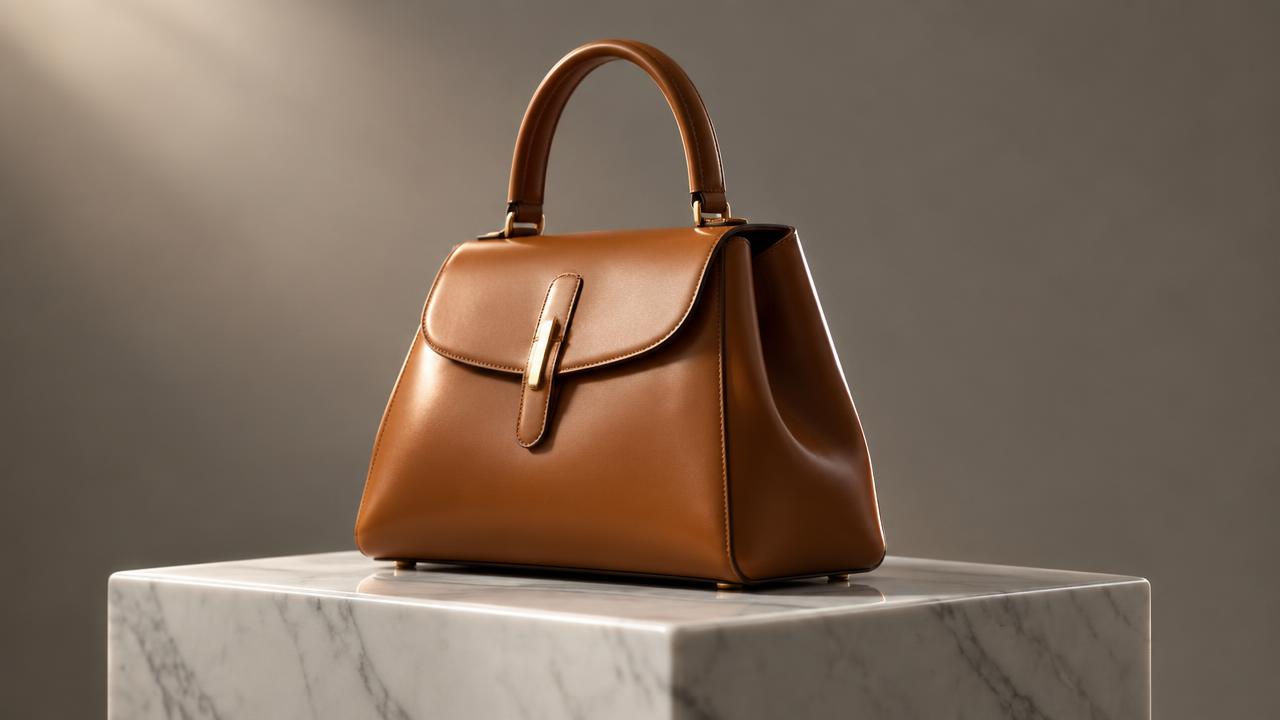
A high-fidelity editorial product shot of a sculptural black leather handbag. The handbag features distinct geometric folds, precise contrast stitching, and a custom-designed brushed gold clasp, highlighting its premium craftsmanship. It is presented on a highly polished white marble plinth, positioned centrally within a minimalist studio environment. The background is a clean, neutral grey gradient, ensuring the product stands out without distraction. Soft, directional studio lighting originates from the upper left, meticulously sculpted to create a sophisticated chiaroscuro effect across the handbag's complex folds and textured leather surface. A subtle, yet distinct, rim light traces the top edge and strap, enhancing its three-dimensional form and separation from the background. Shadows are intentionally soft, graduated, and transparent, revealing underlying textures rather than obscuring them. The lighting emphasizes depth and volume, mimicking a professional high-end studio setup. Captured with a medium telephoto lens, specifically an 100mm equivalent, to achieve an elegant, slightly compressed perspective. The camera angle is at a slightly elevated eye-level, presenting the handbag with authority and presence. A shallow depth of field isolates the handbag as the undeniable focal point, with the marble plinth and background rendered in a gentle, artistic blur. The overall mood is elegant, refined, artistic, serene, and luxurious, suitable for a high-fashion magazine spread.

--ar 3:2 --ar 4:5

Negative Prompts: blurry, grainy, low-res, amateur, busy, cluttered, harsh shadows, overexposed, underexposed, distracting background, text, logo, watermark, human, hands, cheap, plastic, distorted, bad anatomy, ugly, tiling, poorly drawn, out of frame, extra limbs, disfigured, deformed, body out of frame, bad art, poorly drawn item, poorly drawn object, cartoon, illustration, painting, sketch, 3d render, low quality, noise, artifacts, signatures, text, writing, collage, montage, multiple objects, multiple bags, multiple plinths, uneven lighting
Under the hood

Why this prompt works

This prompt structure delivers superior results by employing several targeted prompt engineering techniques. Firstly, role priming—by instructing the AI to act "As an Art Director and Product Photographer"—establishes a professional persona, guiding the model to interpret instructions through a specific, expert lens. This ensures the output adheres to industry standards for high-end photography.

Explicit constraints are central to its effectiveness. The prompt breaks down the image generation into granular details across Subject Focus, Styling, Lighting, Lens/Perspective, and Mood. This level of specificity, particularly with technical terms like "chiaroscuro effect," "subtle rim light," and "medium telephoto lens," minimizes ambiguity and directs the AI towards a precise visual outcome. This contrasts sharply with a one-liner, which would leave too much to the model's interpretation, often resulting in generic or visually inconsistent images.

The structured output requirement for aspect ratio variants and negative prompts is another critical element. Providing specific aspect ratios ensures the generated images are immediately usable in different editorial layouts. The inclusion of negative prompts explicitly tells the AI what to avoid, preventing common pitfalls like blurry elements, clutter, or low-quality rendering, thereby refining the output and reducing the need for post-generation editing. Together, these techniques build a robust framework that consistently produces high-fidelity, art-directed images aligned with specific brand requirements.

Model fit

Best AI models for this prompt

Midjourney

Midjourney excels at interpreting artistic direction and generating visually striking, editorial-style compositions. It handles sophisticated lighting and aesthetic nuances well, making it suitable for high-fashion product photography. While strong on artistic interpretation, achieving absolute photorealism or adhering to very specific brand guidelines might require iterative prompting. See the full Midjourney hub for deeper guidance.

Flux

Flux is adept at rendering intricate material details and complex lighting scenarios, which is crucial for high-end product photography. Its strength lies in generating highly realistic textures, reflections, and subtle shadows that enhance product form. Artistic interpretation might require more specific guidance compared to Midjourney, but its realism capabilities are a significant advantage. See the full Flux hub for deeper guidance.

When to use

  • When creating high-impact editorial visuals for a new luxury fashion accessory launch.
  • For developing consistent, sophisticated product imagery for brand lookbooks or magazine features.
  • To generate hero shots for high-end e-commerce pages that require an art-directed aesthetic.
  • When preparing assets for social media campaigns targeting a discerning, style-conscious audience.
  • For visualizing product concepts during the design phase, focusing on form and material.

When not to use

  • When the primary need is for functional, pure-white background e-commerce shots without artistic flair.
  • For products that are not sculptural or design-focused, where the emphasis should be on utility.
  • If the project requires lifestyle photography with models, dynamic scenes, or complex environments.
  • When working with mass-market or budget-conscious brands where a luxury aesthetic is not aligned.
  • For quick internal mock-ups where high fidelity and artistic direction are not critical.

Get more from it

Pro tips

  • 1

    Vary `{{product_name}}` descriptions by adding specific adjectives like 'hand-stitched leather' or 'polished chrome' to enhance material realism.

  • 2

    Experiment with the `{{surface_material}}` by specifying textures, e.g., 'honed travertine plinth' or 'dark volcanic rock', for nuanced backdrops.

  • 3

    Adjust the 'soft directional lighting' parameters (e.g., 'from top-right', 'diffused light') to control how shadows sculpt the product's form.

  • 4

    Refine negative prompts iteratively; if you see reflections, add 'reflection' to `--no` to clean up the image.

  • 5

    Consider adding a subtle color palette to the mood description, such as 'muted tones' or 'monochromatic', to reinforce brand identity.

  • 6

    Test different telephoto lens equivalents (e.g., '70mm lens', '120mm lens') to see how compression affects the product's presence.

  • 7

    Pay attention to the implied 'serene' or 'luxurious' mood; slight tweaks to these words can shift the overall emotional impact.

Don't ship this

Common mistakes

  • Using overly generic descriptions for the product, leading to a bland or uninspired image.

    Fix — Be highly specific about the product's material, unique shape, and craftsmanship, e.g., 'asymmetric polished brass vase'.

  • Neglecting the lighting details, resulting in flat, uninteresting illumination or harsh shadows.

    Fix — Emphasize 'soft, directional studio lighting' and 'subtle rim light' to guide the AI towards a professional setup.

  • Omitting the lens and perspective details, which can lead to distorted or less elegant product presentation.

    Fix — Always include 'medium telephoto lens (85mm)' and 'eye-level or slightly elevated' for a refined view.

  • Forgetting to include a comprehensive list of negative prompts, causing unwanted elements or low quality.

    Fix — Build a robust `--no` list to filter out noise, clutter, text, and other distracting artifacts from the output.

  • Over-styling the shot with unnecessary props that distract from the main product.

    Fix — Stick to minimalist styling; the `{{surface_material}}` should be the primary complementary element, not additional props.

People also ask

Frequently asked questions

Q.Can this prompt be adapted for products other than fashion accessories?

Yes, absolutely. While framed for fashion, it works for any product where you want to highlight sculptural qualities, premium materials, and an art-directed, minimalist aesthetic. Just update {{product_name}} and {{surface_material}} accordingly.

Q.How specific should I be with the `{{product_name}}` and `{{surface_material}}` inputs?

Be as specific as possible. Instead of 'handbag', use 'sculptural calfskin tote with geometric hardware'. For surfaces, 'honed black granite plinth' is better than 'dark surface'. Specificity improves output quality.

Q.What if I want a different lighting style, like dramatic backlighting?

You can modify the 'Lighting Description' section. Change 'soft directional lighting' to 'dramatic backlighting with strong contrast' but be aware it will alter the mood significantly from the original intent.

Q.Is it possible to include a subtle brand logo or text within the image?

AI image models generally struggle with precise text and logos. Attempting to include them often results in garbled or distorted characters. It's best to add branding in post-production if accuracy is critical.

Q.How many iterations should I expect to run before getting a usable image?

Expect to run several iterations. Initial runs provide a baseline, then you'll fine-tune by adjusting specific words in the prompt, refining negative prompts, and trying different aspect ratios to achieve the desired result.

Version 1.0Last reviewed July 20, 2026
Reviewed by PromptInFlow Editorial Team