Action Sequence Choreography Prompt
Break a fight, chase or stunt into beats with clear spatial geography so the action stays readable.
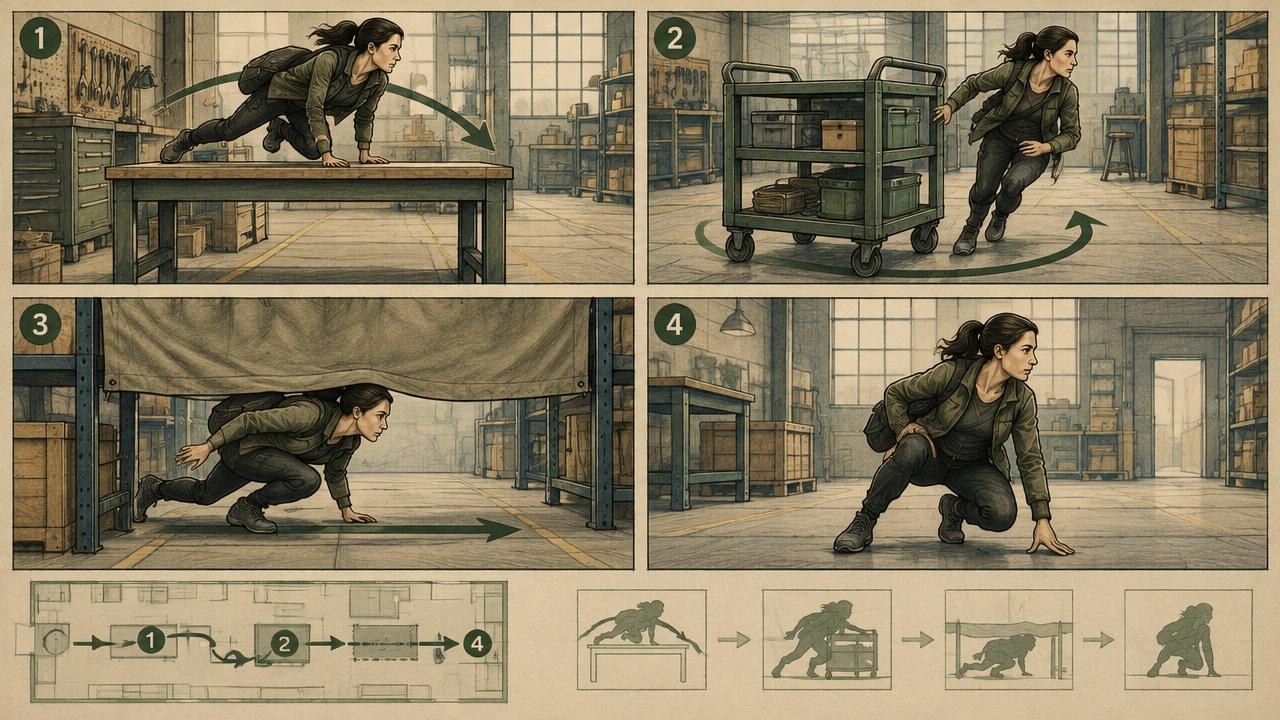
Choreographs an action sequence for AI video by fixing the line of action, breaking movement into beats with impact frames, defining camera position per beat and keeping subject positions consistent between shots.
Ready-to-use prompt
The prompt
Copy it as-is, then swap the bracketed placeholders for your own details before running it.
Role: You are an action director choreographing a sequence for AI video generation.

Context:
- Action type: {{action_type}} (chase, fight, stunt, sport)
- Participants: {{participants}}
- Location: {{location}}
- Total length: {{duration_seconds}} seconds

Task: Choreograph the sequence with:
1. A fixed line of action, stating who moves screen-left and who moves screen-right
2. Beats of one to two seconds, each with a single clear movement
3. An impact or peak frame per beat with its timecode
4. Camera position and shot size for each beat, respecting the line
5. Speed treatment per beat (real time, slight slow, ramped)
6. Continuity notes for wardrobe, props and injuries

Rules:
- Never cross the line of action.
- One readable movement per beat.
- Carry continuity details forward between beats.

Output: a beat sheet table plus a per-beat generation prompt list.
Estimated results
Editor's note
Why this prompt matters
Action is geometry. Audiences follow a chase because they know who is going which way, and they lose it the moment screen direction flips. Generative models have no memory of the previous shot, so they flip direction constantly unless you tell them not to. This prompt does two things that fix most generated action: it fixes a line of action and states screen direction for every participant, and it breaks the sequence into one-movement beats with a named impact frame, so each clip has a payoff rather than a blur of motion.
Why this matters: This technique depends on screen direction, single-action beats, impact frames, and carried state. A visually attractive take can still fail continuity or editability when those cues disagree. Establish one controlled reference, vary one element at a time, and compare every result against the same anchors before adding more motion or styling.
Anatomy
Prompt engineering breakdown
Role
Specialist video direction role priming
Context
Break a fight, chase or stunt into beats with clear spatial geography so the action stays readable.
Goal
Choreograph a readable action sequence across multiple beats.
Constraints
Explicit numeric and directional constraints replace subjective adjectives.
Output format
beat sheet table plus per-beat prompts
Why this structure works
Declaring the line of action and screen direction gives every independent generation the same spatial rule. Short beats with a single movement match what current models can resolve in one clip. Naming the impact frame gives the beat a peak, and repeating continuity notes in each beat prompt compensates for the model having no memory between generations.
What you'll get
Expected output
Beat 1 0.0-1.2s | Runner enters frame left to right, medium wide 35mm, camera right of the line | real time | peak at 1.0s as they vault the rail Beat 2 1.2-2.4s | Pursuer follows same direction, low angle 24mm | slight slow | peak at 2.1s hand slap on the rail Beat 3 2.4-4.0s | Runner cuts into an alley, over-shoulder 50mm from camera right | ramp to 200 percent | peak at 3.4s
Continuity: runner wears a grey hood with a torn left sleeve from beat 2 onward.
Under the hood
Why this prompt works
Declaring the line of action and screen direction gives every independent generation the same spatial rule. Short beats with a single movement match what current models can resolve in one clip. Naming the impact frame gives the beat a peak, and repeating continuity notes in each beat prompt compensates for the model having no memory between generations.
A practical review should separate subject accuracy, motion, camera, and environment rather than judging the clip as one impression. Packing a whole fight or chase into one clip produces muddled movement and broken geography. Split the sequence into short beats, preserve the action axis, and edit the approved clips together.
Review test: Watch each beat without sound and verify the start pose, travel direction, impact, and end pose are readable.
Production check: Plan an edit point after every major action. Short clips with readable starts and finishes are easier to reorder, retime, or replace than one ambitious continuous take, especially when impacts and screen direction must remain precise.
Preserve one unmistakable landmark or background axis across coverage. It helps the viewer understand geography when individual clips vary slightly in framing or character placement.
Model fit
Best AI models for this prompt
Veo
Use natural-language cinematography to direct screen direction, single-action beats, impact frames, and carried state. Veo works best when physical cause, scene response, and camera intent form one coherent description; treat numeric settings as visual cues rather than guaranteed literal controls.
Kling
Use Subject Binding or the Element Library for recurring subjects, then direct screen direction, single-action beats, impact frames, and carried state. Place the bound identity before style and action. Kling can produce expressive motion, so reduce simultaneous changes when consistency weakens.
Runway
Use Gen-4 References to lock the approved subject or composition, then prompt primarily for screen direction, single-action beats, impact frames, and carried state. Generate difficult actions as separate short clips and assemble them in an editor when exact timing or continuity matters.
When to use
- For chases, fights, sports and stunt sequences.
- When previsualising action before a real shoot.
- For trailers built from generated clips.
When not to use
- For dialogue-led scenes.
- For single-shot generations under two seconds.
- When the action requires precise real-world stunt accuracy.
Get more from it
Pro tips
- 1
Write the line of action at the top of every beat prompt.
- 2
Keep beats between one and two seconds.
- 3
Give each beat an impact frame timecode.
- 4
Copy wardrobe and prop details into every beat prompt verbatim.
- 5
Review one controlled take for screen direction, single-action beats, impact frames, and carried state before increasing complexity.
Don't ship this
Common mistakes
✗ Letting screen direction flip between beats.
Fix — State the line of action and the direction of travel in every prompt.
✗ Two actions in one beat.
Fix — Split it into two beats with separate camera positions.
✗ Dropping continuity between generations.
Fix — Repeat wardrobe, prop and damage details in each beat prompt.
✗ Packing a whole fight or chase into one clip produces muddled movement and broken geography.
Fix — Split the sequence into short beats, preserve the action axis, and edit the approved clips together.
People also ask
Frequently asked questions
Q.Why does my action sequence feel confusing?
Screen direction is flipping between clips. Fix a line of action and state travel direction in every beat prompt.
Q.How many beats should a sequence have?
Three to six for a short sequence. Each beat should be one to two seconds with a single movement.
Q.Can one generation cover the whole sequence?
Rarely well. Generate beats separately and cut them together, which also gives you control over pacing.