Wardrobe Continuity Across Scenes Prompt
Keep clothing, colours, fit and wear identical from shot to shot, including damage that accumulates.
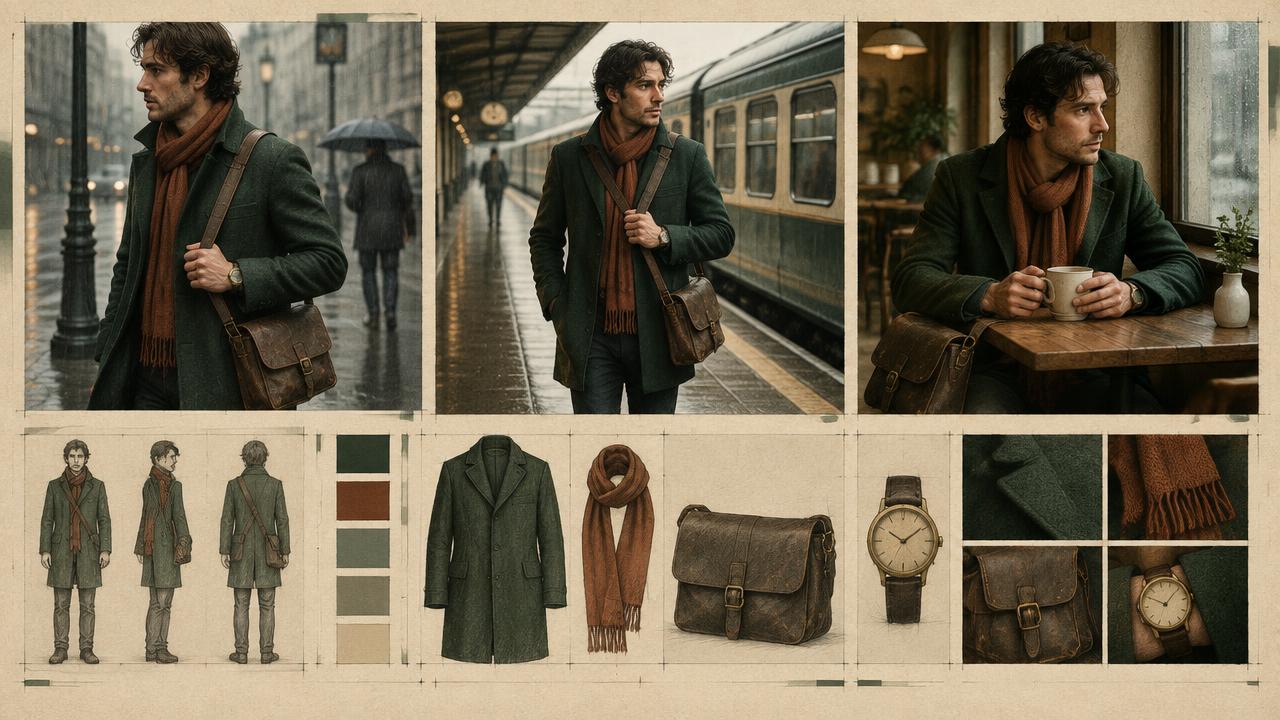
Locks wardrobe details for AI video across a sequence, specifying garments, colours, fabrics, fit, layering order and progressive wear so clothing does not change between generated shots.
Ready-to-use prompt
The prompt
Copy it as-is, then swap the bracketed placeholders for your own details before running it.
Role: You are a costume continuity supervisor for an AI-generated sequence.

Context:
- Character: {{character_block}}
- Sequence: {{sequence_summary}}
- Number of shots: {{shot_count}}
- Story time span: {{time_span}}

Task: Produce a wardrobe continuity sheet containing:
1. Each garment with colour, fabric, fit and closure state (buttoned, open, rolled)
2. Layering order from skin outward
3. Accessories with placement (watch on which wrist, bag on which shoulder)
4. Baseline condition (clean, worn, faded)
5. Progressive changes by shot number (mud, tears, sweat, rain soak)
6. A one-line WARDROBE LOCK to paste into every shot prompt

Rules:
- Damage only accumulates, it never disappears.
- Accessory sides must never swap.
- Colour names must stay identical across the sheet.

Output: a wardrobe table by shot plus the WARDROBE LOCK line.
Estimated results
Editor's note
Why this prompt matters
Wardrobe is where continuity errors are most visible and easiest to prevent. A jacket that is open in one shot and zipped in the next, a watch that jumps wrists, mud that vanishes between clips: viewers notice all of it, even when they cannot say why a sequence feels wrong. Because generated shots are independent, the only defence is a written lock. This prompt produces both the per-shot wardrobe table and a single sentence you paste into every generation, plus a cumulative damage plan so wear builds rather than resetting.
Why this matters: This technique depends on layering, closure state, accessory side, and cumulative wear. A visually attractive take can still fail continuity or editability when those cues disagree. Establish one controlled reference, vary one element at a time, and compare every result against the same anchors before adding more motion or styling.
Anatomy
Prompt engineering breakdown
Role
Continuity and direction role priming
Context
Keep clothing, colours, fit and wear identical from shot to shot, including damage that accumulates.
Goal
Keep wardrobe identical and cumulative across generated shots.
Constraints
Locked, repeated wording and explicit continuity rules replace subjective description.
Output format
wardrobe table by shot plus lock line
Why this structure works
A single-sentence lock line is short enough to survive alongside a full scene description, which is why it holds where paragraph-long wardrobe notes fail. Specifying layering order and accessory sides removes the two most common swaps. Framing damage as cumulative gives the sequence a direction of travel that the model can follow shot by shot.
What you'll get
Expected output
WARDROBE LOCK: faded olive canvas jacket open over white cotton tee, dark indigo denim, brown leather boots, steel watch on left wrist.
Shot 1: baseline, clean Shot 2: unchanged, jacket collar turned up Shot 3: mud streak on right knee, sleeves rolled to forearm Shot 4: mud streak persists, tee damp at collar, jacket now zipped
Under the hood
Why this prompt works
A single-sentence lock line is short enough to survive alongside a full scene description, which is why it holds where paragraph-long wardrobe notes fail. Specifying layering order and accessory sides removes the two most common swaps. Framing damage as cumulative gives the sequence a direction of travel that the model can follow shot by shot.
A practical review should separate subject accuracy, motion, camera, and environment rather than judging the clip as one impression. Generated clips reset clothing state, causing repaired damage, switched wrists, and changed colours. Use one short wardrobe lock plus a per-shot table that repeats every accumulated change.
Review test: Review shots in story order and mark every closure, rolled sleeve, accessory side, stain, tear, and wet area.
Production check: Export the wardrobe table with the shot list so every generation starts from the same source. Do not rely on reference imagery alone for hidden details such as closure state, accessory side, or cumulative damage.
Photograph or export each approved wardrobe state as its own reference. Pairing written locks with the correct stage image is safer than reusing one clean reference after damage begins.
Model fit
Best AI models for this prompt
Veo
Use natural-language cinematography to direct layering, closure state, accessory side, and cumulative wear. Veo works best when physical cause, scene response, and camera intent form one coherent description; treat numeric settings as visual cues rather than guaranteed literal controls.
Kling
Use Subject Binding or the Element Library for recurring subjects, then direct layering, closure state, accessory side, and cumulative wear. Place the bound identity before style and action. Kling can produce expressive motion, so reduce simultaneous changes when consistency weakens.
Runway
Use Gen-4 References to lock the approved subject or composition, then prompt primarily for layering, closure state, accessory side, and cumulative wear. Generate difficult actions as separate short clips and assemble them in an editor when exact timing or continuity matters.
When to use
- For multi-shot sequences with the same character.
- When a journey or event changes the character over time.
- When several people are generating shots from the same brief.
When not to use
- For single shots.
- For fashion content where each shot is a different outfit by design.
- For crowd or background characters.
Get more from it
Pro tips
- 1
Keep the lock line under 30 words.
- 2
Name the wrist, shoulder and side for every accessory.
- 3
Track damage in a table so nothing resets.
- 4
Regenerate any shot where a garment colour shifts, do not fix it in grade.
- 5
Review one controlled take for layering, closure state, accessory side, and cumulative wear before increasing complexity.
Don't ship this
Common mistakes
✗ Damage disappearing in later shots.
Fix — List cumulative damage per shot and repeat prior damage in each prompt.
✗ Accessories swapping sides.
Fix — State the side explicitly in the lock line.
✗ Using different colour words for the same garment.
Fix — Fix one colour name per garment and reuse it exactly.
✗ Generated clips reset clothing state, causing repaired damage, switched wrists, and changed colours.
Fix — Use one short wardrobe lock plus a per-shot table that repeats every accumulated change.
People also ask
Frequently asked questions
Q.Why does clothing change between my generated shots?
Each generation is independent. Without a repeated wardrobe lock line the model reinvents the outfit every time.
Q.How do I show a character getting dirty?
Track damage cumulatively by shot and restate all earlier damage in each new prompt.
Q.Can I change outfits mid-sequence?
Yes, but write it as a new wardrobe lock from a stated shot number so the change is deliberate rather than drift.