Two-Character Scene Consistency Prompt
Keep two people distinct and stable in the same shot without the model blending their features.
Handles two-character AI video shots by contrasting identity markers, fixing screen positions and eyelines, and separating wardrobe palettes so the model does not merge or swap the two people between generations.
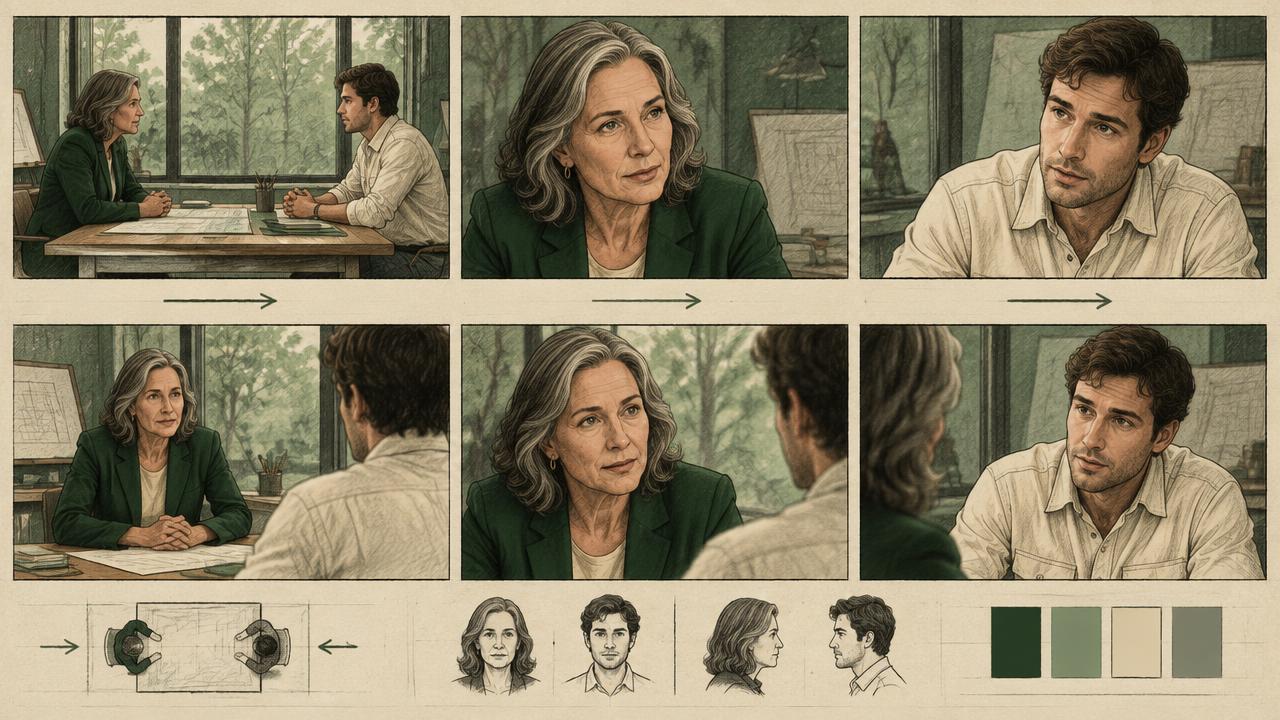
Ready-to-use prompt
The prompt
Copy it as-is, then swap the bracketed placeholders for your own details before running it.
Role: You are a continuity supervisor writing two-character shots for AI video.

Context:
- Character A lock: {{character_a}}
- Character B lock: {{character_b}}
- Interaction: {{interaction}}
- Shot length: {{duration_seconds}} seconds

Task: Write the shot with:
1. A contrast table showing how A and B differ in hair, build, wardrobe palette and one facial marker
2. Fixed screen positions (who is camera left, who is camera right)
3. Eyeline directions for both characters
4. Height difference and relative framing
5. The single interaction beat and who initiates it
6. A separation rule so features do not blend

Rules:
- The two characters must differ on at least three visible axes.
- Screen positions may not swap within a shot.
- Describe A fully before starting B, never interleave them.

Output: a contrast table plus a single shot prompt paragraph.
Estimated results
Editor's note
Why this prompt matters
Put two people in a generated frame and the model will often average them, giving both characters the same haircut, the same age and eventually the same face. The problem is that descriptions interleave in the attention window, so features leak between subjects. Two techniques fix most of it: describe each character completely and sequentially rather than trading details back and forth, and force contrast on multiple visible axes so there is nothing plausible to average toward. This prompt does both, and fixes screen positions so the pair does not swap sides between takes.
Why this matters: This technique depends on sequential descriptions, visible contrast, screen position, and eyelines. A visually attractive take can still fail continuity or editability when those cues disagree. Establish one controlled reference, vary one element at a time, and compare every result against the same anchors before adding more motion or styling.
Anatomy
Prompt engineering breakdown
Role
Continuity and direction role priming
Context
Keep two people distinct and stable in the same shot without the model blending their features.
Goal
Keep two characters distinct and stable in the same shot.
Constraints
Locked, repeated wording and explicit continuity rules replace subjective description.
Output format
contrast table plus shot prompt paragraph
Why this structure works
Sequential description reduces feature leakage between subjects. Requiring contrast on three visible axes, especially wardrobe palette and build, makes blending visibly wrong to the model. Fixed screen positions and eyelines maintain spatial continuity between takes, and a single interaction beat keeps the shot resolvable within a short clip.
What you'll get
Expected output
Contrast: A - short cropped grey hair, heavy build, navy wool coat, deep vertical brow line B - long auburn braid, slight build, mustard knit sweater, freckled cheeks
Shot: A stands camera left, B camera right, A is a head taller. A looks down toward B, B holds eyeline up and slightly right. A extends a folded paper toward B, B hesitates before taking it. Medium two-shot, 40mm, eye level between them, soft key from camera left.
Under the hood
Why this prompt works
Sequential description reduces feature leakage between subjects. Requiring contrast on three visible axes, especially wardrobe palette and build, makes blending visibly wrong to the model. Fixed screen positions and eyelines maintain spatial continuity between takes, and a single interaction beat keeps the shot resolvable within a short clip.
A practical review should separate subject accuracy, motion, camera, and environment rather than judging the clip as one impression. Interleaved descriptions let facial, wardrobe, and position attributes leak between subjects. Describe each person completely, contrast at least three visible traits, and fix their screen sides.
Review test: Pause before the interaction and identify each person by silhouette and palette, then check stable screen sides and eyelines.
Production check: When dialogue or action crosses the frame, generate a short neutral setup first. Confirm both identities and screen positions before requesting the performance. This isolates identity failures from movement failures and reduces costly full-scene retries.
For reverses, repeat both characters even when only one is prominent. The off-camera relationship still controls eyeline, shoulder position, and screen direction, so omitting it can break the edit.
Model fit
Best AI models for this prompt
Veo
Use natural-language cinematography to direct sequential descriptions, visible contrast, screen position, and eyelines. Veo works best when physical cause, scene response, and camera intent form one coherent description; treat numeric settings as visual cues rather than guaranteed literal controls.
Kling
Use Subject Binding or the Element Library for recurring subjects, then direct sequential descriptions, visible contrast, screen position, and eyelines. Place the bound identity before style and action. Kling can produce expressive motion, so reduce simultaneous changes when consistency weakens.
Runway
Use Gen-4 References to lock the approved subject or composition, then prompt primarily for sequential descriptions, visible contrast, screen position, and eyelines. Generate difficult actions as separate short clips and assemble them in an editor when exact timing or continuity matters.
When to use
- For dialogue-free two-hander scenes.
- For interviews, handoffs and confrontations.
- Whenever a model keeps merging two people.
When not to use
- For crowd scenes with many characters.
- For solo shots.
- When both characters must look similar, such as twins.
Get more from it
Pro tips
- 1
Contrast hair, build and wardrobe colour at minimum.
- 2
Never interleave the two descriptions.
- 3
Lock who stands camera left for the entire scene.
- 4
Use a two-shot at medium size before attempting tight coverage.
- 5
Review one controlled take for sequential descriptions, visible contrast, screen position, and eyelines before increasing complexity.
Don't ship this
Common mistakes
✗ Alternating details between the two characters.
Fix — Describe A completely, then B.
✗ Similar hair and wardrobe colour on both.
Fix — Force contrast on at least three visible axes.
✗ Letting the pair swap sides between takes.
Fix — State camera left and camera right in every prompt.
✗ Interleaved descriptions let facial, wardrobe, and position attributes leak between subjects.
Fix — Describe each person completely, contrast at least three visible traits, and fix their screen sides.
People also ask
Frequently asked questions
Q.Why do my two characters end up looking alike?
Interleaved descriptions and low contrast. Describe them sequentially and force differences in hair, build and wardrobe colour.
Q.Can I do a tight two-shot?
It is the hardest case. Get the medium two-shot working first, then try tighter framing with maximum contrast.
Q.How do I keep positions consistent?
State camera left and camera right in every prompt and never swap them within a scene.