Reference Character Sheet Prompt for AI Video
Write a locked character description you can paste into every shot so the same person appears each time.
Produces a reusable character sheet for AI video, fixing face structure, hair, skin, build, wardrobe and distinguishing marks in fixed wording so every subsequent generation renders a recognisably identical person.
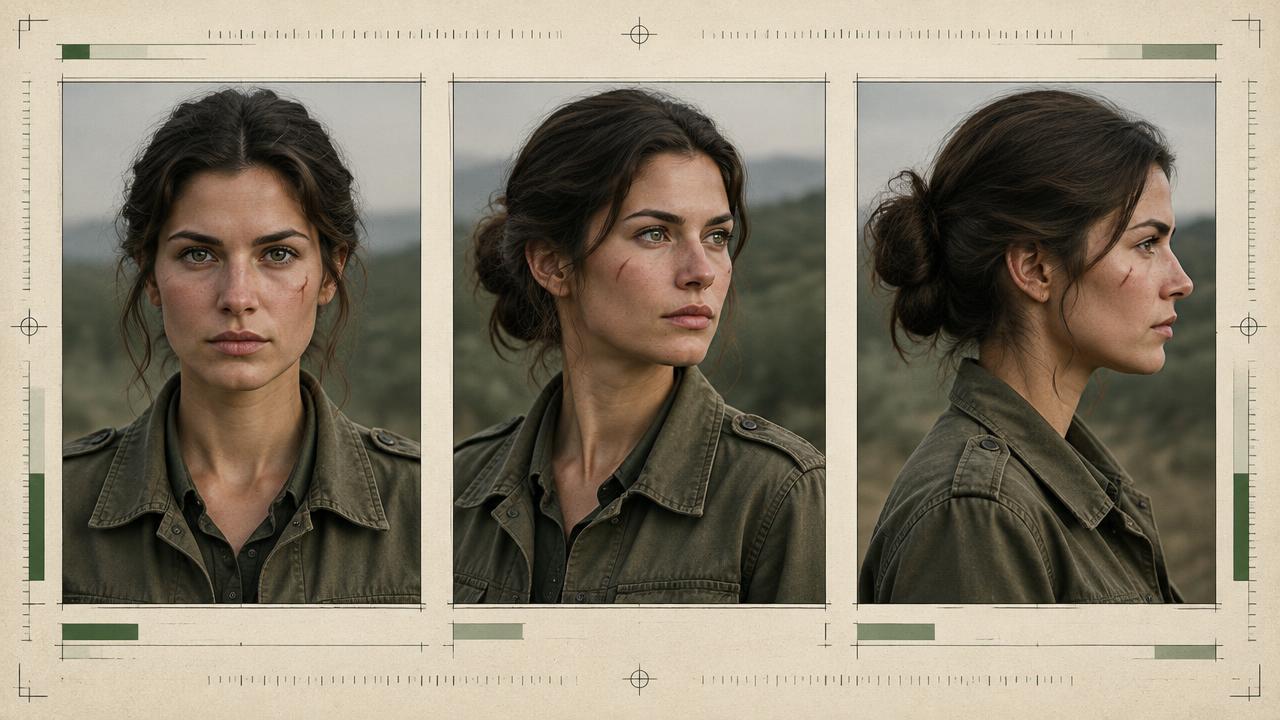
Ready-to-use prompt
The prompt
Copy it as-is, then swap the bracketed placeholders for your own details before running it.
Role: You are a casting and continuity supervisor building a reusable character sheet for AI video.

Context:
- Character role: {{role}}
- Age range: {{age_range}}
- Setting: {{setting}}
- Story tone: {{tone}}

Task: Produce a locked character block that can be pasted unchanged into every shot prompt. Include:
1. Identity line: age range, build, height impression and heritage cues only when relevant to the brief.
2. Face structure: face shape, jawline, nose, brow, eye shape and colour, mouth and resting expression.
3. Hair: length, texture, colour, parting, hairline and normal styling state.
4. Skin: tone, texture, freckles, scars and complexion notes, with side and placement for every mark.
5. Two distinguishing anchors that remain visible at medium-shot size.
6. Default wardrobe with fixed colour names, fabrics, fit, layering and accessory sides.
7. Voice, posture, habitual gesture and movement tempo for performance continuity.
8. A reference capture list: neutral front, three-quarter and profile views under even light, plus a full-body wardrobe frame.
9. A short negative drift list naming features that must not change, such as age, hair length, eye colour or accessory side.

Rules:
- Use the same locked wording every time; do not paraphrase between shots.
- Keep the reusable character block under 140 words and move shot-specific action, emotion and lighting outside it.
- Prefer concrete nouns and physical relationships over subjective beauty or personality adjectives.
- Do not mix mutually exclusive wardrobe, age or hair states in one block.
- Use references only when you have permission to depict the person or source material.

Output: a titled LOCKED CHARACTER BLOCK, a four-frame REFERENCE CAPTURE LIST, a DO NOT DRIFT list, and a short usage note explaining what stays fixed and what may change.
Estimated results
Editor's note
Why this prompt matters
A character sheet is the continuity source of truth for generated video. Without one, every new prompt quietly changes a colour word, hairstyle, accessory side or facial proportion, and each small change gives the model permission to cast someone new. The cost appears later, when individually attractive shots cannot be edited into one believable sequence.
A useful sheet is not a biography and not a wall of adjectives. It separates identity from the scene, records features that remain visible on screen, and pairs a short reusable text block with clean reference views. It also states what must not drift. That combination lets the director change action, mood and camera position without accidentally changing the performer.
Anatomy
Prompt engineering breakdown
Role
Continuity and direction role priming
Context
Write a locked character description you can paste into every shot so the same person appears each time.
Goal
Create a reusable locked character description for AI video.
Constraints
Locked, repeated wording and explicit continuity rules replace subjective description.
Output format
locked character block plus usage note
Why this structure works
Fixed wording removes the variance that causes drift between shots. Concrete anatomical nouns give the model reproducible targets, while beauty adjectives do not. Limiting the block to 120 words keeps it influential rather than diluted, and placing it first gives it priority in the attention window. Two distinguishing marks act as a verification signal so you can spot drift immediately.
What you'll get
Expected output
LOCKED CHARACTER BLOCK - MAYA Woman, early thirties, athletic slim build, medium height. Oval face, defined jaw, straight narrow nose, arched brows, almond dark brown eyes, full mouth. Shoulder-length black hair, loose waves, centre parting, slightly windblown. Warm olive skin, light freckles across the nose bridge, small crescent scar above the left eyebrow. Wears a faded olive canvas jacket, white cotton tee, dark denim. Steady posture, deliberate movements.
Usage: paste this block verbatim at the start of every shot prompt before the scene description.
Under the hood
Why this prompt works
The locked block stays short enough to retain influence after the scene prompt is added. Fixed colour names, accessory sides and anatomical relationships remove avoidable ambiguity, while the reference capture list supplies views that text cannot fully encode. The negative drift list helps reviewers reject plausible but incorrect takes before they enter an edit.
Separating immutable identity from mutable scene detail is the key discipline. Face, marks and base wardrobe remain fixed; expression, pose, damage and lighting can change deliberately. Because the package is portable, it also prevents different team members from creating competing versions of the same character.
Model fit
Best AI models for this prompt
Veo
Use the LOCKED CHARACTER BLOCK at the beginning of each clip prompt and pair it with clean reference images in Veo workflows that support reference-to-video. Veo benefits from rich, concrete character description, but separate generations still need the same identity evidence. Keep action and camera direction after the lock, and avoid asking one clip to cover several unrelated shots. Validate the same face anchors when moving from medium shots to close-ups.
Kling
Kling's Element Library and Subject Binding workflows are the closest match to a production character sheet. Supply clean multi-angle references so the binding has frontal, three-quarter and profile evidence, then keep the text block focused on identity anchors and wardrobe. This is particularly useful for turns, longer movement and temporary occlusion. If hair, accessories or clothing are critical, make them clearly visible in the source views rather than relying on a paragraph to reconstruct hidden detail.
Runway
Choose a neutral, evenly lit image as the main Gen-4 Reference and save it with a reusable tag. Add complementary references only when they contribute a missing angle, object or wardrobe view; too many competing visual instructions can make review harder. Runway recommends building complex looks iteratively, so generate and approve a clean profile or full-body frame, then feed that result back as a new reference. Let the reference carry likeness while the text prompt concentrates on motion.
When to use
- Before any multi-shot story with a recurring person.
- When several creators or generations must share one approved identity.
- For a recurring brand character, presenter or episodic fictional lead.
- When the character must survive location, lighting, wardrobe-condition or camera-angle changes.
When not to use
- For anonymous background figures or one-off silhouettes.
- As permission to imitate a real person's likeness without consent.
- When every shot intentionally features a different person.
- For a single simple clip where a full continuity package adds more work than value.
Get more from it
Pro tips
- 1
Approve one canonical text block and reference set before generating production shots.
- 2
Use front, three-quarter, profile and full-body views with matching age, hair and wardrobe state.
- 3
Track mutable details such as dirt or wetness separately from the base character sheet.
- 4
Name each saved reference consistently so the wrong character or wardrobe version is never selected.
Don't ship this
Common mistakes
✗ Turning the sheet into a long biography.
Fix — Keep only visible, repeatable identity and performance traits in the locked block.
✗ Using a dramatic image as the only reference.
Fix — Start with a neutral, evenly lit identity view, then add style or lighting references separately.
✗ Combining conflicting versions of the character.
Fix — Freeze one approved age, hairstyle, wardrobe state and accessory placement before generating shots.
People also ask
Frequently asked questions
Q.How long should the character block be?
Under 120 words. Longer blocks dilute the key features and get partially ignored once a scene description is appended.
Q.Does this replace reference images?
No, it complements them. On models that accept an image, use both, with the block shortened to the key identifiers.
Q.How do I know if the character drifted?
Check the two distinguishing marks. If the scar or freckles are missing, the identity has drifted and the shot should be regenerated.