Facial Feature Lock Prompt
Describe a face in the terms models reproduce reliably, so the same person survives close-ups and wide shots.
Builds a face-focused description for AI video that fixes proportions, feature shapes, skin detail and expression baseline, so identity holds between close-ups, medium shots and different lighting setups.
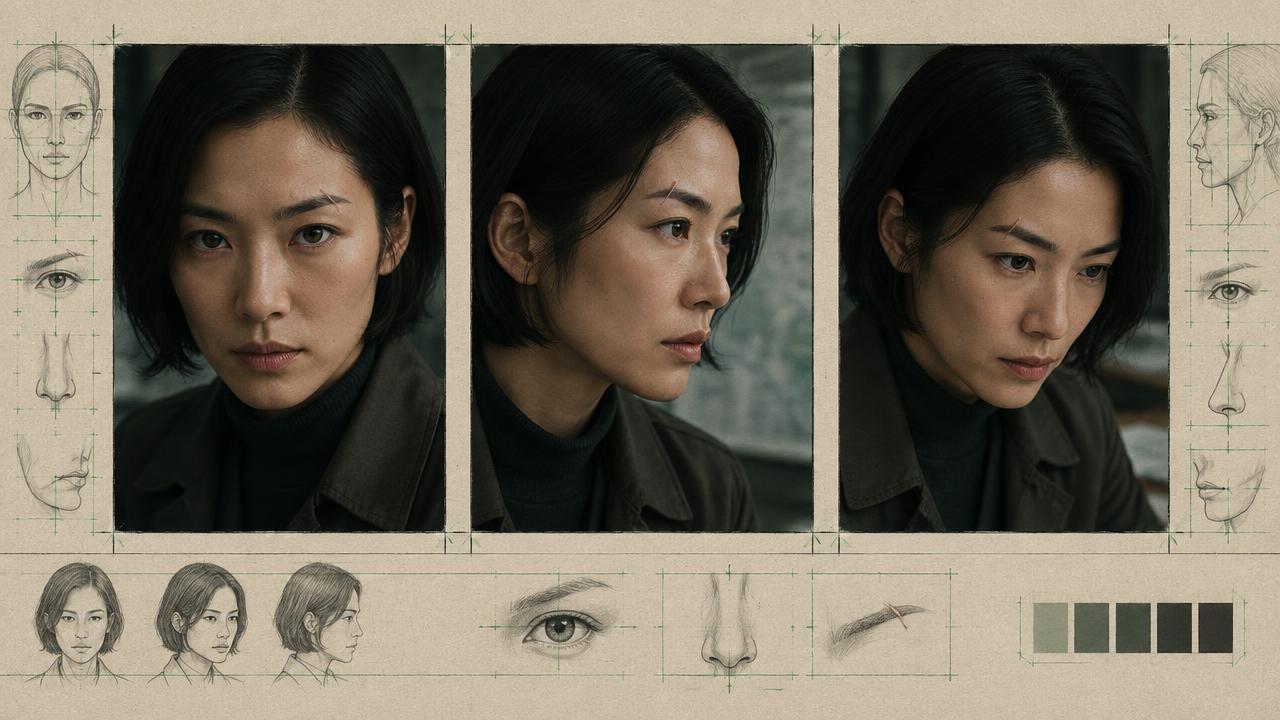
Ready-to-use prompt
The prompt
Copy it as-is, then swap the bracketed placeholders for your own details before running it.
Role: You are a portrait and continuity specialist writing facial descriptions for AI video.

Context:
- Character: {{character_name}}
- Age: {{age}}
- Shot types needed: {{shot_types}}

Task: Write a facial lock that holds across shot sizes. Specify:
1. Face proportions: shape, width-to-length impression, cheekbone height, jaw definition and chin profile. Put these structural features first because they remain visible from a medium shot through a close-up.
2. Eyes: shape, spacing, colour, lid type, brow shape and thickness. Use one fixed colour term and distinguish eye shape from expression.
3. Nose: bridge height and width, nostril width, tip shape and profile.
4. Mouth: upper-to-lower lip ratio, resting expression, smile asymmetry and whether teeth show at rest.
5. Skin detail visible in close-up: pore visibility, freckles, lines, scars and their exact side and position.
6. Expression baseline and a bounded change under emotion. Describe the physical change, such as brows drawing together, rather than replacing the face with an emotion adjective.
7. Hairline, parting, facial hair and any feature that can disappear at a new angle.
8. A continuity check naming the three features that must be visible before accepting a take.

Rules:
- Order features from largest to smallest so priority survives truncation.
- Include one reproducible asymmetry; faces described as perfectly balanced tend to become generic.
- Keep close-up-only texture in a separate optional sentence so wide shots are not overloaded.
- Reuse the FACE LOCK verbatim in every generation. Do not swap synonyms for colours, shapes or feature positions.
- Keep lighting, age and baseline expression out of conflict with the scene prompt. If the scene changes lighting, preserve the same facial structure and marks.
- Treat lens, frame-rate and camera terms as visual direction, not guaranteed physical camera settings.

Output: a FACE LOCK paragraph, a CLOSE-UP ADDENDUM sentence, and a three-point CONTINUITY CHECK. Keep the FACE LOCK concise enough to repeat unchanged in every shot.
Estimated results
Editor's note
Why this prompt matters
Close-ups expose identity drift immediately. A description that looks adequate at medium distance leaves the model free to reinvent eye spacing, jaw shape, age, skin texture or expression once the face fills the frame. This matters because viewers are unusually sensitive to facial changes: a sequence can preserve wardrobe and colour perfectly yet still feel like it contains two actors.
The practical fix is not a longer list of flattering adjectives. It is a stable hierarchy of structural features, one visible asymmetry, and a separate close-up addendum for texture. The lock must be copied without paraphrasing, then tested under the actual angles and shot sizes in the sequence. Reference images improve the odds, but they do not remove the need to identify which details are non-negotiable.
Anatomy
Prompt engineering breakdown
Role
Continuity and direction role priming
Context
Describe a face in the terms models reproduce reliably, so the same person survives close-ups and wide shots.
Goal
Keep a character face identical across shot sizes.
Constraints
Locked, repeated wording and explicit continuity rules replace subjective description.
Output format
face lock paragraph plus close-up addendum
Why this structure works
Ordering features from largest to smallest means the structural information survives if the model attends to only part of the description. Splitting close-up detail into an addendum prevents over-specification at wide shot sizes. A stated resting expression stops the model defaulting to a smile, and a named asymmetry gives both realism and a drift check.
What you'll get
Expected output
FACE LOCK: oval face, mid-height cheekbones, softly defined jaw, wide-set almond hazel eyes with slight hooded lids, straight brows of medium thickness, narrow nose with a rounded tip, medium-full lips resting neutral, faint smile lines at the left corner only.
CLOSE-UP ADDENDUM: visible pores across the nose, three small freckles under the right eye, a two centimetre pale scar along the left jaw.
Under the hood
Why this prompt works
The FACE LOCK puts geometry before texture because face shape, spacing and feature proportions carry identity across more viewing distances than pores or fine lines. The CLOSE-UP ADDENDUM prevents small details from competing with the scene in wide shots. A named asymmetry gives the face a realistic anchor and gives the reviewer a fast drift test.
The three-point continuity check turns a subjective judgement into a repeatable approval step. If the eye spacing, jaw profile and anchor mark survive, the take is likely usable; if one disappears, regenerate before building more shots on the wrong identity. Repeating identical wording also removes prompt variation as a source of drift.
Model fit
Best AI models for this prompt
Veo
Use a detailed identity description early in the prompt, followed by the shot and action. For separate clips, provide the same reference image or reference set where the current Veo workflow supports it; do not rely on one generation remembering another. Veo is useful when the face must stay coherent while framing and cinematic direction change, but keep one shot goal per clip and compare matched frames before accepting continuity.
Kling
Use Kling's Subject Binding or Element Library workflow when available rather than treating the facial paragraph as the only identity control. Multi-angle references are especially valuable when the shot turns from frontal to profile or briefly hides the face. Keep the prose lock short and diagnostic: fixed asymmetry, resting expression, hairline and two structural proportions. If Kling beautifies or smooths the subject, explicitly preserve natural texture and the asymmetric feature.
Runway
Build the identity around a clean Gen-4 Reference with even light and a neutral expression, then save and reuse that reference. Runway's own guidance treats the image as the identity source, so avoid re-describing every facial detail differently in each motion prompt. Use the FACE LOCK to reinforce the few attributes most likely to drift, while keeping the video instruction focused on movement, camera and expression. Test profile or extreme-lighting frames separately before committing to a sequence.
When to use
- For recurring hosts, spokespeople, actors or fictional leads who appear across independently generated clips.
- Before a sequence moves between wide, medium and close framing.
- When lighting, wardrobe or location changes make identity drift harder to diagnose.
- When a team needs one approved identity description to reuse across multiple shots.
When not to use
- For distant, silhouetted or background figures whose facial detail is never readable.
- As a substitute for consent or rights clearance when recreating a real person.
- When a single disposable shot does not need continuity.
- When an image-reference workflow already holds the likeness perfectly; use the shorter lock only as reinforcement.
Get more from it
Pro tips
- 1
Choose three review anchors: one structural proportion, one asymmetry and one hairline or facial-hair feature.
- 2
Keep a neutral reference frame alongside the approved text lock so every collaborator starts from the same identity.
- 3
Generate a close-up, medium shot and profile test before producing the full sequence.
- 4
Change only one variable between tests so you can identify whether angle, expression, light or motion caused the drift.
Don't ship this
Common mistakes
✗ Describing attractiveness instead of identity.
Fix — Replace subjective words with measurable-looking shapes, spacing, side-specific marks and a fixed resting expression.
✗ Assuming a model remembers the previous clip.
Fix — Repeat the same text lock and reuse the same reference asset for every independent generation.
✗ Changing face, camera, lighting and emotion at once.
Fix — Test one change at a time and compare the same three identity anchors in every take.
People also ask
Frequently asked questions
Q.Why does the face change in close-ups?
Medium shot descriptions leave close-up detail unspecified, so the model invents it. Add a close-up addendum with skin and mark detail.
Q.How much detail is too much?
If the face lock is longer than the scene description, it is too long. Structure first, texture in the addendum.
Q.Does lighting affect identity?
Strongly. Keep key direction and colour temperature consistent, or state them per shot alongside the face lock.