Background Character and Crowd Consistency Prompt
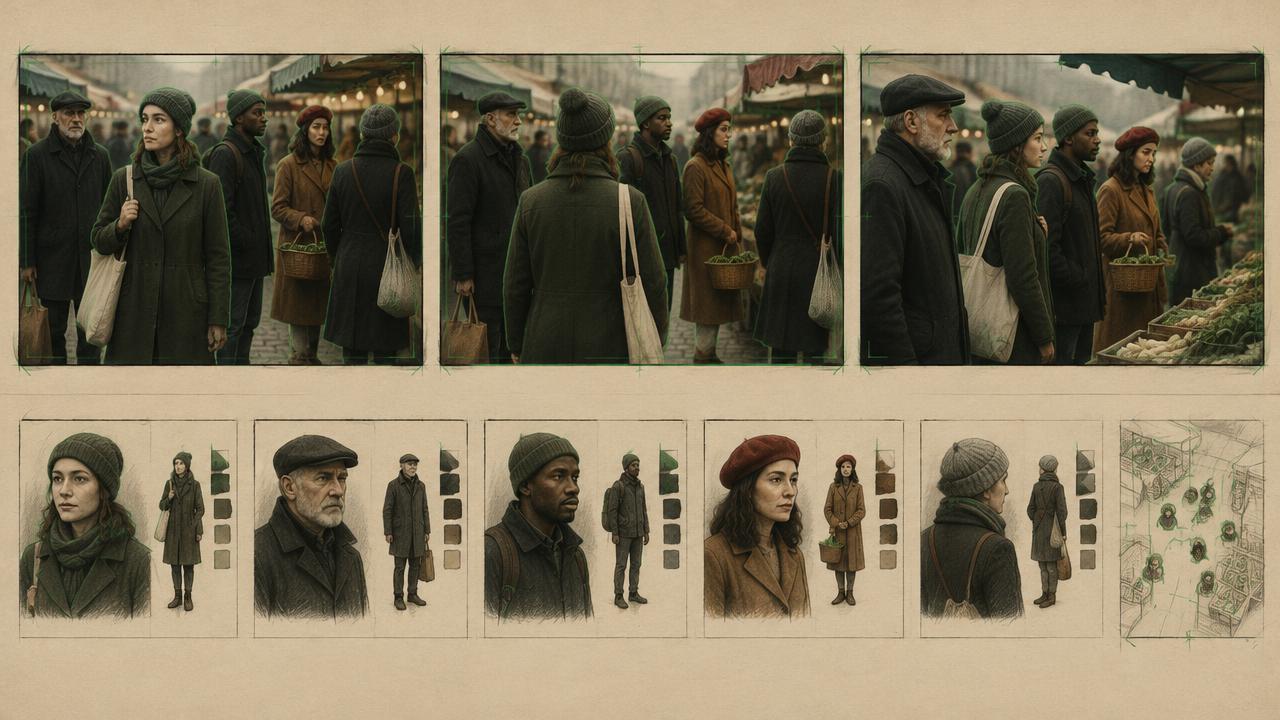
Populate a scene with extras that stay consistent in style and density without stealing focus from the lead.
Directs background characters in AI video by setting crowd density, wardrobe palette rules, movement patterns and focus separation, so extras stay stylistically consistent and never distract from the main character.
Ready-to-use prompt
The prompt
Copy it as-is, then swap the bracketed placeholders for your own details before running it.
Role: You are a crowd supervisor writing background populations for AI video.

Context:
- Location: {{location}}
- Lead character lock: {{character_block}}
- Crowd density: {{density}} (sparse, moderate, busy)
- Shot length: {{duration_seconds}} seconds

Task: Define the background population with:
1. Density and approximate count band per depth plane
2. Wardrobe palette rule for extras (muted, cool neutrals, period appropriate)
3. Movement pattern (crossing, queueing, seated, milling) and speed
4. Focus separation from the lead (depth of field, contrast, colour)
5. Rules preventing extras from looking at camera or the lead
6. Continuity rules for extras across shots in the same scene

Rules:
- Keep the lead unobstructed and visually dominant.
- Hold crowd density and travel direction across adjoining shots.
- Use shared background actions rather than individual performances.

Output: a depth-plane crowd plan plus one reusable CROWD LOCK paragraph.
Estimated results
Editor's note
Why this prompt matters
Extras exist to make a place feel inhabited, and they fail when they become the most interesting thing in the frame. Generative models are prone to exactly that: a background figure in a red coat walks through and the eye follows them instead of your lead. The controls that fix it are the same ones a real crowd supervisor uses, which are palette, density per depth plane, movement direction and focus separation. This prompt writes them into a reusable block, including the rules that stop extras looking at camera or crossing in front of the lead.
Why this matters: This technique depends on crowd density, depth-plane movement, and lead separation. A visually attractive take can still fail continuity or editability when those cues disagree. Establish one controlled reference, vary one element at a time, and compare every result against the same anchors before adding more motion or styling.
Anatomy
Prompt engineering breakdown
Role
Continuity and direction role priming
Context
Populate a scene with extras that stay consistent in style and density without stealing focus from the lead.
Goal
Populate scenes with consistent, non-distracting background characters.
Constraints
Locked, repeated wording and explicit continuity rules replace subjective description.
Output format
crowd spec block
Why this structure works
Setting density per depth plane gives the model a spatial distribution instead of a vague crowd. A muted palette rule reserves colour contrast for the lead, which is the most reliable focus control. Explicit movement patterns prevent chaotic motion, and the no-camera-look rule removes the single most distracting artefact in generated crowds.
What you'll get
Expected output
Density: moderate, six to nine figures on the mid plane, three to four on the far plane, none in the foreground. Wardrobe: muted cool neutrals, greys and navy, no saturated colours, no logos. Movement: crossing left to right at walking pace, two figures queueing at the kiosk. Focus: mid plane softly out of focus at f2.0, lead in sharp focus, lead is the only warm colour in frame. Rules: no extra looks at camera or at the lead, no extra crosses in front of the lead.
Under the hood
Why this prompt works
Setting density per depth plane gives the model a spatial distribution instead of a vague crowd. A muted palette rule reserves colour contrast for the lead, which is the most reliable focus control. Explicit movement patterns prevent chaotic motion, and the no-camera-look rule removes the single most distracting artefact in generated crowds.
A practical review should separate subject accuracy, motion, camera, and environment rather than judging the clip as one impression. Over-directing every extra creates flicker and steals attention from the lead. Use two or three shared movement patterns, fixed density bands, and a protected foreground around the lead.
Review test: Freeze on the busiest frame and compare the next shot for matching population density, palette, and travel direction.
Production check: Before final delivery, compare a clean plate, the busiest crowd frame, and the adjacent shot. The lead should remain readable at thumbnail size while crowd density, travel direction, and depth distribution stay recognisably stable.
For close-ups, reduce visible extras rather than adding more individual detail. A smaller, clearly layered crowd is easier to keep stable than many distinct faces competing near the lead.
Use the same crowd lock in establishing shots and tighter coverage. Repetition is intentional here: it gives the generator a stable population rule even when the camera distance changes. Keep a lower-density fallback take for small screens, where overlapping silhouettes become harder to separate. Review that fallback independently before delivery. Confirm lead visibility, stable density, matching direction, consistent palette, and believable depth before approval. Approve only when every criterion survives the cut.
Model fit
Best AI models for this prompt
Veo
Use natural-language cinematography to direct crowd density, depth-plane movement, and lead separation. Veo works best when physical cause, scene response, and camera intent form one coherent description; treat numeric settings as visual cues rather than guaranteed literal controls.
Kling
Use Subject Binding or the Element Library for recurring subjects, then direct crowd density, depth-plane movement, and lead separation. Place the bound identity before style and action. Kling can produce expressive motion, so reduce simultaneous changes when consistency weakens.
Runway
Use Gen-4 References to lock the approved subject or composition, then prompt primarily for crowd density, depth-plane movement, and lead separation. Generate difficult actions as separate short clips and assemble them in an editor when exact timing or continuity matters.
When to use
- For street, cafe, office and event scenes.
- When a scene feels empty or artificial.
- When extras are pulling focus from the lead.
When not to use
- For intimate two-hander scenes.
- For product shots on clean backgrounds.
- When crowd detail is not visible at the chosen shot size.
Get more from it
Pro tips
- 1
Reserve saturated colour for the lead only.
- 2
Specify counts per depth plane in bands, not exact numbers.
- 3
Forbid camera looks and foreground crosses in every prompt.
- 4
Reuse the same crowd block in every shot of the scene.
- 5
Review one controlled take for crowd density, depth-plane movement, and lead separation before increasing complexity.
Don't ship this
Common mistakes
✗ Extras in bright colours near the lead.
Fix — Give extras a muted palette rule and keep saturation for the lead.
✗ Undefined crowd density.
Fix — State count bands per depth plane.
✗ Extras looking at camera.
Fix — Add an explicit rule that no background figure looks at camera or at the lead.
✗ Over-directing every extra creates flicker and steals attention from the lead.
Fix — Use two or three shared movement patterns, fixed density bands, and a protected foreground around the lead.
People also ask
Frequently asked questions
Q.How do I stop extras stealing focus?
Mute their palette, push them out of focus and forbid foreground crosses and camera looks.
Q.Do extras need to be consistent between shots?
Their style, density and palette should be. Individual faces do not need to match unless a specific extra recurs.
Q.What density works best?
Sparse to moderate. Busy crowds are less stable frame to frame on most models.